Quit Yelling at Your Prompt
/ 7 min read
Table of Contents
The workflow I keep trying to get from a prompt
When I ask an agent to make a code change, I want it to do more than edit the code.
I want the run to follow these steps:
- Create a clean worktree.
- Make the requested change there, not in the main checkout.
- Review the diff against the request.
- Run the relevant validation.
- Open the changed surface and capture a screenshot.
- Report back with the diff, the command output, and the screenshot.
- Package all of that into a clear PR.
That is the actual job. The code change is only one part of it.
So we write more instructions in the prompt, or we put them into a skill:
Make this change in a fresh worktree.Do not touch the main checkout.Review your diff against the request.Run the validation command.Open the changed page.Capture a screenshot of the result.Do not call it done unless you can show me the diff, the command output, and the screenshot.Most of the time, models can follow this prompt. But when something unexpected happens, the model is more likely to drop one of the steps. A test might fail and need investigation. The screenshot might show a visual issue. The database might take longer than expected to start.
The validation might be from before the last edit. The screenshot might show the old state. The final message might leave out the diff review. The model may have done useful work and still dropped one requirement that mattered.
So we make the prompt more forceful:
DO NOT SKIP.
MANDATORY.
HARD RULE. NO EXCEPTIONS.
Brian Suh has a useful phrase for this moment. If you have resorted to writing MANDATORY or DO NOT SKIP, you have probably hit the ceiling of prompting.
We should stop asking, “How do I make this prompt more forceful?” We should ask, “Why is this still just a prompt?”
Text can ask. It cannot enforce.
A prompt can describe the workflow clearly.
But it cannot make the worktree exist before the model starts editing. It cannot force validation to run after the final patch instead of before it. It cannot require a screenshot file to exist before the run can be marked complete. It cannot make the final message include the evidence if the model has already decided the task is over.
Text can request those things. But it cannot enforce them.
The model should still do the parts that need judgment. It should decide which files to inspect. It should explain why the diff matches the request. It should notice when a screenshot looks wrong. It should summarize the tradeoff when validation fails. A human should still decide whether the result is good enough to ship.
But models are not consistently reliable at tracking facts:
- Was the worktree created?
- Did the change happen inside it?
- Was the diff reviewed?
- Did validation run after the last edit?
- Does the screenshot exist?
- Does the final message contain the evidence?

You can write requests in text. You can put checks in the harness.
The same problem shows up outside coding
The same pattern shows up in other agent work.
One useful public example came from someone running a QA agent over roughly 200 markdown requirement files. The task was reasonable. For each file, decide whether the app met the requirement. Each item needed judgment, so it sounded like agent work.
At first, it worked. But then the run got longer. Some files were missed. Some files were checked more than once. One failure caused previous files to enter the run again.
Instead of trying to fix the prompt, they moved part of the work into a harness. A harness is code around the model that controls the steps. They gave the model one file, stored the result, and then moved to the next file. Their code kept the list, the order, the saved output, and the rule for when the work was complete.
When you ask the model to track every item in a repeated task, you are asking the least predictable part of the system to hold the most important guarantees.
Put the requirement where the system can check it
The fix is to move requirements out of the prompt when they keep getting missed.
If the agent must work in a worktree, create the worktree as a required step. If validation is required, capture the validation output. If the UI is part of the request, require a screenshot file. If a human needs to decide whether something can ship, add a review gate.
You do not need a workflow for every task. Some work is unclear. Some work is exploratory. Some work should stay loose until you understand it.
But if you find yourself yelling at your agent, the requirement is probably in the wrong place.

Move the requirement to the place where the system can check it.
One phrase from the research stuck with me. Make compliance structural, not optional. I like this framing because it avoids a lot of effort spent trying to make the model behave. Use different tools for different jobs. Put rules that must always be true into a harness. Keep the model for the parts where loose instructions help.
Introducing Hermes Workflows
Hermes Workflows is my version of this idea. It is close to Claude Code Dynamic Workflows. The goal is to move the repeated steps into a script the system can run, inspect, and resume. That is better than asking one chat to remember the whole plan. It also draws inspiration from the work on Recursive Language Models from Alex Zhang in Dr. Omar Khattab’s lab.
The coding workflow above is the shape Hermes Workflows should make easy.
A coding workflow can create the worktree first. Then it can hand the change to an agent. Then it can run a review step over the diff. Then it can run validation. Then it can require a screenshot file. Then it can ask a human whether the result is good enough to package into a PR.
In code, the shape should be this boring:
from dataclasses import dataclassfrom typing import Literal
from hermes_workflows import agent, ask, workflow

@dataclassclass CodingRequest:    repo: str    task: str    validation_command: str    preview_url: str

@dataclassclass ChangeReview:    action: Literal["approve", "request_changes"]    feedback: str = ""
    @property    def approved(self) -> bool:        return self.action == "approve"

@workflowasync def coding_change(request: CodingRequest):    worktree = await create_worktree(request.repo)
    patch = await agent(        "coding-agent",        prompt="Make the requested change inside the worktree.",        input={"task": request.task, "worktree": worktree},    )
    diff_review = await agent(        "reviewer",        prompt="Review the diff against the original request.",        input={"task": request.task, "patch": patch},    )
    validation = await run_validation(worktree, request.validation_command)    screenshot = await capture_screenshot(worktree, request.preview_url)
    decision = await ask(        prompt="Approve this change for PR packaging?",        input={            "patch": patch,            "diff_review": diff_review,            "validation": validation,            "screenshot": screenshot,        },        returns=ChangeReview,    )
    if not decision.approved:        return await request_changes(worktree, decision.feedback)
    return await package_pr(        worktree=worktree,        patch=patch,        validation=validation,        screenshot=screenshot,    )
That is a better contract than “remember to do all of this.”
In Hermes Workflows, agent(...) asks a worker for typed output, which means a structured result that code can check. ask(...) asks a person or review surface for typed input. parallel(...) runs work at the same time without making the model remember the whole loop. pipeline(...) keeps staged work moving through visible state instead of a chat transcript.
The pieces are small on purpose. You can leave the writing or coding to the model while making the risky transitions explicit. The workflow can pause for a person. It can resume later. It can store the file paths, decisions, and failures somewhere other than chat scrollback.
The dashboard helps for the same reason. If the work is only in chat, the next human or agent has to reconstruct what happened from a transcript. With a workflow, you can see what ran, what waited, what was approved, what file was produced, and what is blocked now.
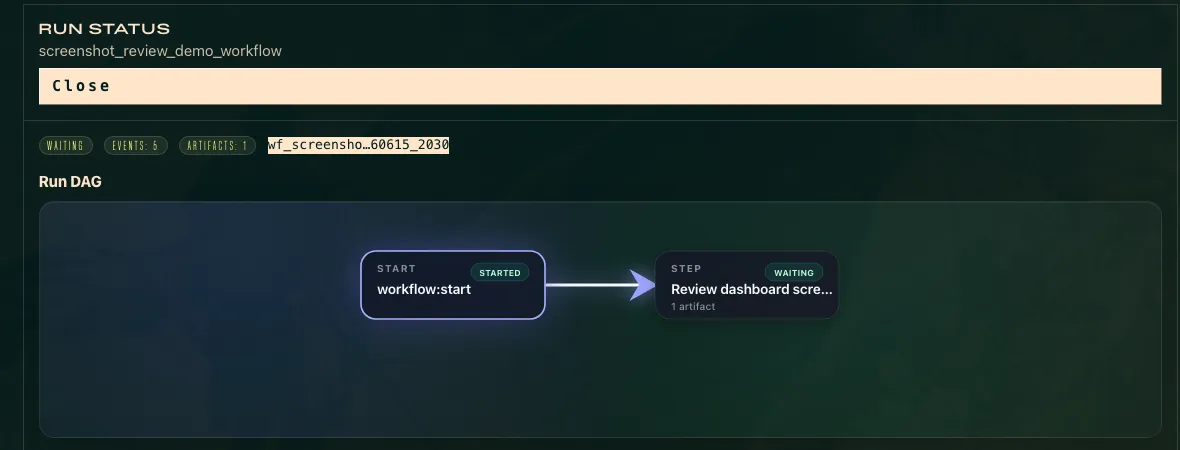
The run has state. The transcript is not enough.
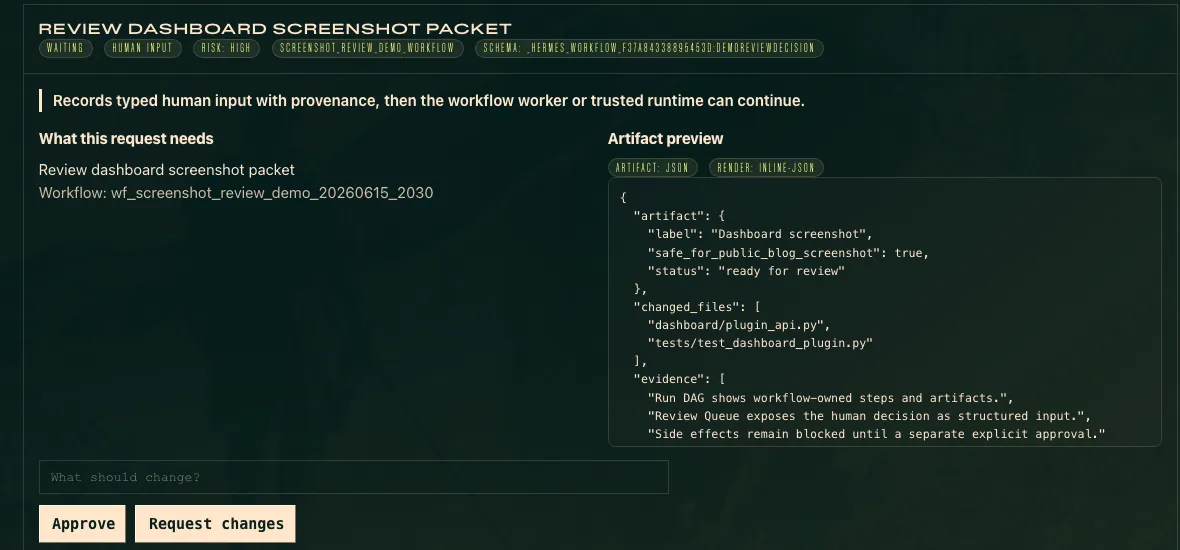
Human review is a required step, not a sentence the model has to remember.
The product argument is simple. Use prompts for requests. Put requirements where the system can check them.
Quit yelling at your prompt.
Give the requirements a place where the system can check them.
Learn more about Hermes Workflows